Business automation with AI: what really changes for an SME
Business automation with AI: what it really changes, examples by trade, how to get started and the mistakes SMEs should avoid.
Updated on
AI automation is often announced as a revolution. In the SMEs I work with, it looks more like a series of small wins: a reminder that goes out on its own, an invoice entered without retyping, a quote request that lands straight in the CRM. That is what this guide describes: what AI changes in practice, where to start, and how to avoid the most common failures.
What is AI automation?
Classic automation follows fixed rules. "When a form is submitted, create a contact in the CRM and send a confirmation email." It is fast, reliable and cheap, as long as the data arrives in a predictable format.
AI adds the ability to read and understand. It can extract the amount and supplier from an invoice received as a PDF, classify an email by intent, summarise a client request or write a first draft reply. It works on unstructured data, exactly where fixed rules fail.
In practice, a good workflow combines the two: rules for everything predictable, AI only for the steps that require interpretation. Adding AI where a simple rule would do makes the system more expensive, slower and less predictable.
The building blocks to know
- Automation platforms (Make, n8n, Zapier): they connect your applications and orchestrate the steps. I compare them in my article Make vs n8n vs Zapier.
- Language models (LLMs): they read, classify, summarise and write.
- Document extraction (OCR and AI): it turns a PDF or a photo into usable data.
- AI agents: they chain several actions together and fetch the information they need, for example from your internal documentation. I cover them in my agentic RAG guide.
The AI and automation glossary (in French) defines each of these terms.
From RPA to intelligent automation
RPA (Robotic Process Automation) means having a software robot reproduce a human's clicks in an interface. It works, but it is fragile: a moved button or a new invoice template can block the robot. In its report Get ready for robots, EY estimated that 30 to 50% of initial RPA projects failed, largely because they targeted the wrong processes.
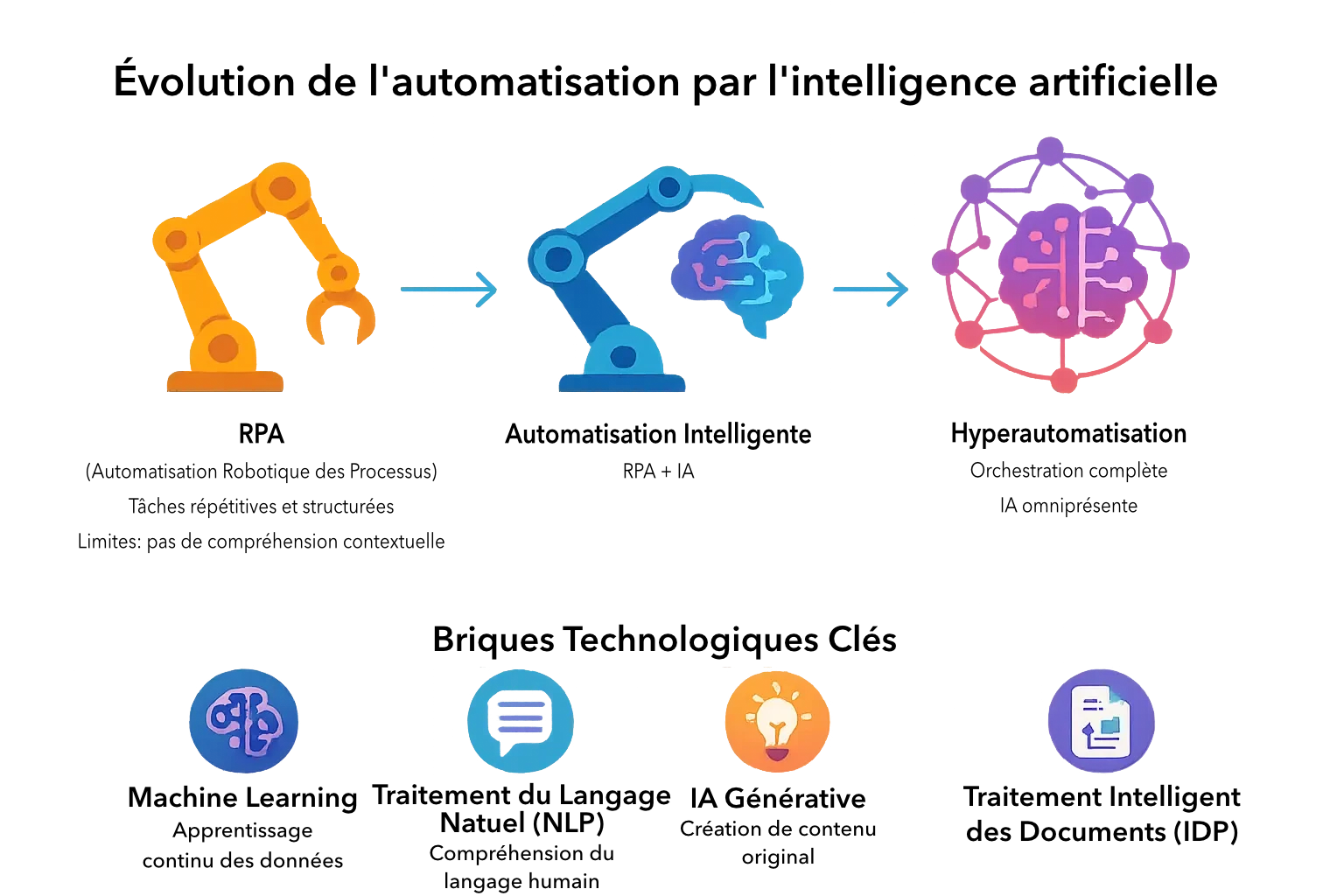
Modern automation relies instead on software APIs, which are more stable than an interface, and uses AI to understand content rather than its layout. When a supplier changes its invoice template, extraction keeps working, because the system reads the document instead of looking for a field at a fixed position.
Concrete examples by type of business
Fiduciary firm: no more retyping invoices
A fiduciary firm receives invoices every day by email, as PDFs or photos. The workflow detects the attachment, extracts the key data and prepares the accounting entry. The employee only approves, and handles the cases the system flags as doubtful: inconsistent amount, unknown supplier, missing VAT.
I describe this case on the page about automation for fiduciary firms (in French).
Tradesperson: no forgotten quotes
An electrician receives a quote request through their website. The contact is created automatically in the CRM, a confirmation email goes out immediately, and a follow-up reminder appears in their calendar a few days later. AI can also summarise the request and extract the site address and the type of work. For a request from a company, the workflow can complete the record with its business sector, identified by its NOGA code.
Online retail: complaints sorted on arrival
Complaints arrive by email in all sorts of forms. AI can sort them by reason as soon as they arrive and prepare a draft reply, which the team approves before sending. The online shop Be Store Outlet reduced the manual handling of its complaints by 90% this way.
Service business: onboarding a new employee
Onboarding a new employee often involves several people: creating accounts, sending documents, planning the first weeks. A workflow can trigger all these steps from a single record, and check that none has been forgotten.
| Trade | Manual task | Automation | What stays human |
|---|---|---|---|
| Fiduciary firm | Invoice entry | Data extraction and entry preparation | Approval, doubtful cases |
| Tradesperson | Following up quote requests | CRM contact, confirmation, reminder | The quote itself |
| Online retail | Customer complaints | Sorting and draft reply | Approval, disputes |
| Services | Onboarding an employee | Accounts, documents, schedule | Welcome and training |
How to get started
1. Choose the right first process
The right candidate is frequent, repetitive, has clear rules and carries little risk if something goes wrong. Measure the current situation first: how many times a month, how many minutes each time, how many errors to correct. Without that baseline, there is no way to know whether the automation actually paid off.
2. Describe the process before automating it
Automating an unclear process reproduces its ambiguities, only faster. Who does what, in which order, with which exceptions? This description often takes longer than building the workflow, and that is normal.
3. Choose the tool based on your constraints
Make suits most SMEs that want a visual, affordable tool. n8n is the natural choice when data is sensitive, because it can be hosted in Switzerland. Zapier remains the simplest for light needs. The tool matters less than the quality of the design.
4. Plan for errors from the start
An expiring access token, a changed format, a missing value: every workflow needs an alert and a way to recover. You should be warned before your client is.
5. Train the team and document
An automation nobody understands becomes a liability. The team needs to know what the workflow does, how to monitor it and who to turn to. That is the purpose of my n8n and Make training in Geneva.
Key point: one useful, measured first workflow is worth more than a big automation programme. It serves as proof, and it teaches the team to work with these tools.
Data protection: what the Swiss FADP implies
The revised Swiss Federal Act on Data Protection (FADP, known in French as nLPD) has been in force since 1 September 2023. It applies to processing by AI just as it does to any other processing of personal data.
In practice, for each workflow, you need to know:
- which personal data flows through it (clients, employees, patients);
- which services it is sent to: the automation platform, but also every connected application and every AI service called;
- in which countries these services process the data;
- how long it is kept.
Hosting n8n in Switzerland helps you stay in control, but it is not enough if the workflow then sends the data to an AI model hosted elsewhere. Choosing and configuring the model is part of the design.
The four mistakes I see most often
- Automating everything at once. The project becomes unmanageable before it has produced any result.
- Removing humans from sensitive decisions. A reply to a dispute, an unusual accounting entry or a refusal to a client must still be approved by a person.
- Stacking tools without an overall view. Three platforms, ten accounts, no documentation: technical debt builds up fast.
- Putting AI everywhere. A simple rule is faster, cheaper and more predictable. AI should be reserved for the steps that genuinely require interpretation.
My view
AI automation is now within reach of any SME, without a large IT budget. The tools are mature, language models read most administrative documents correctly, and a first workflow can be built in a few days.
What separates a successful project from an abandoned one is almost never the technology. It is the clarity of the starting process, error handling and the team's ability to take over what has been built. Those are the three points I focus my work on.
If you want to identify your first process to automate, I explain my approach, from audit to go-live, on the page process automation and AI in Geneva. And to see where your business stands in the Swiss context, read why Swiss SMEs are adopting automation.
Useful sources
- EY, Get ready for robots: why planning makes the difference between success and disappointment (2016)
- SME Portal of the Swiss Confederation, New data protection act (nLPD) (in French)
- Federal Office of Justice, Strengthening data protection (in French)
Frequently asked questions
What I’m asked most often
- What is the difference between classic automation and AI automation?
- Classic automation applies fixed rules: if this condition, then that action. AI adds the ability to read and understand unstructured content, such as an email, a PDF or a photo of an invoice. In practice, the best projects combine the two: rules for everything predictable, AI only where interpretation is needed.
- Which process should I start with?
- A frequent, repetitive task with clear rules, where a mistake would not be serious. Invoice reminders, entering contact requests into a CRM or preparing a report are good candidates. Avoid starting with a process nobody has ever described precisely.
- Is AI automation compatible with the Swiss FADP?
- Yes, provided you know which data flows, to which services and in which countries. The revised Swiss Federal Act on Data Protection, in force since 1 September 2023, applies fully to processing by AI. A self-hosted tool such as n8n helps you stay in control, but every AI service called must also be reviewed.
- Do I need a large budget to automate with AI?
- No. A first workflow in Make or n8n can be built in a few days, and subscriptions start at a few dozen francs a month. The main cost is design and testing time, which is why it pays to start with a small, measurable scope.
- Will AI replace my staff?
- In an SME, automation mostly removes the copying and chasing tasks nobody enjoys. Decisions, client relationships and handling exceptions remain human. I always design workflows with human approval on sensitive steps.

Written by
Thierry Barbezat
Independent consultant in Geneva. Co-owner of an SME for ten years before moving full-time into automation, web design and SEO. CAS in digital communication from the University of Geneva, certified in n8n and Make.
Related articles
- Make vs n8n vs Zapier: which automation tool should you choose?
Make, n8n or Zapier? A 2026 comparison of the three automation tools: verified prices, ease of use, data hosting and SME use cases.
- Why Swiss SMEs are adopting automation and AI
34% of Swiss SMEs built AI into their processes in 2025. Verified figures, use cases, obstacles and a method for automating without taking risks.
- Agentic RAG: definition, how it works and use cases
What is agentic RAG? How it differs from classic RAG, how it works, concrete SME use cases, its limits and how to build it with n8n.
First call, no commitment
Tell me what’s eating your time.
Thirty minutes is enough to know whether your situation lends itself to automation, and roughly what it would take. If it doesn’t, I’ll tell you on that call.